


Stay on Top of Every Google Review
Your online reputation influences what people think about your business before they ever contact you. GreenRope brings Google review monitoring into a convenient dashboard, so you can see new feedback, identify reviews awaiting a response, and keep up with what customers are saying.
Filter by date range and location, see your average rating, and track review activity over time. With the important numbers in one view, your team can spend less time checking reviews and more time connecting with customers.
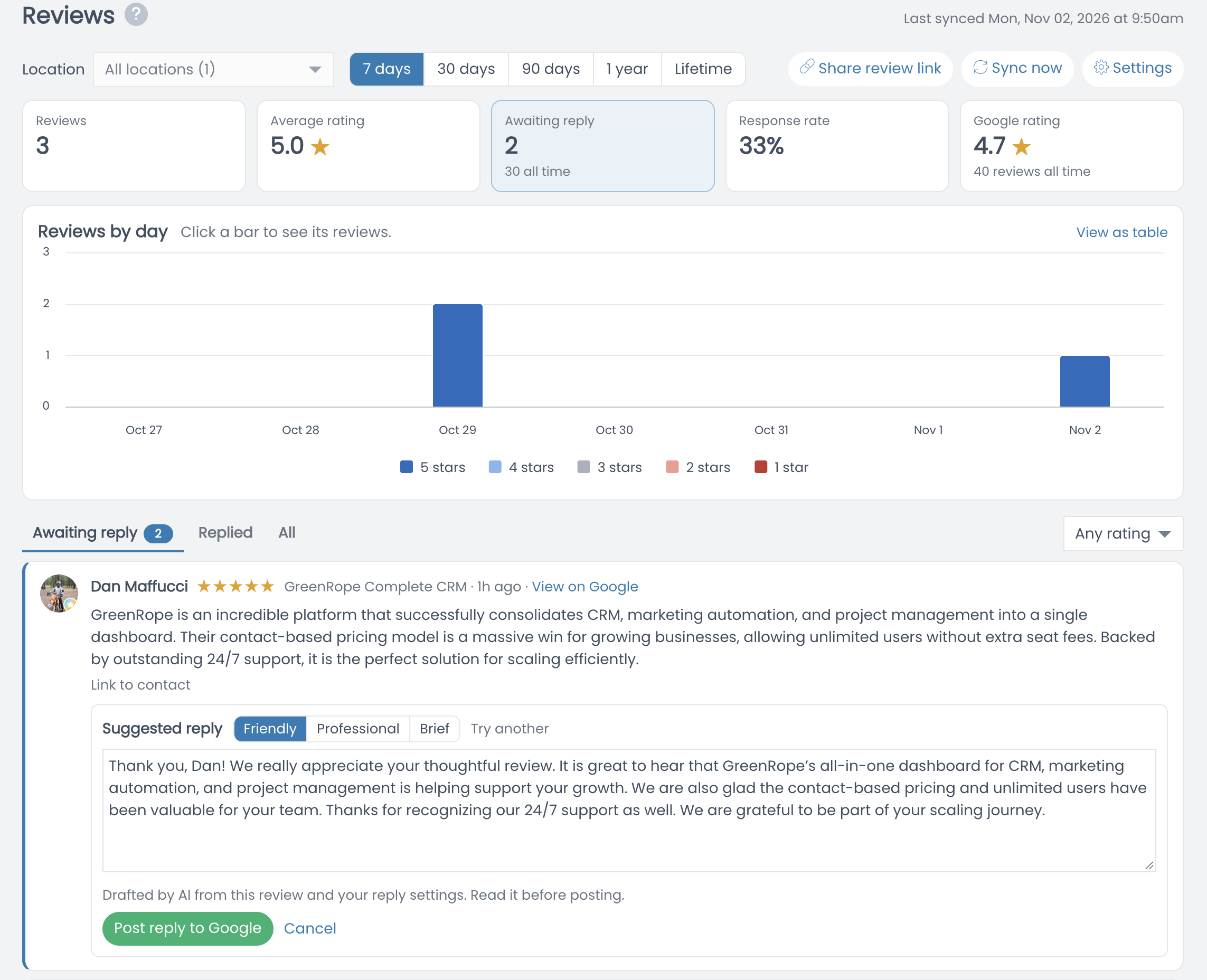
Turn Customer Feedback Into Timely Responses
Keep the Conversation Going
See which reviews need your attention and make it easier to reply.
Responding to feedback shows customers that their experience matters. GreenRope separates reviews awaiting a reply from those you've already addressed, helping you prioritize follow-up and stay organized.
For Google reviews, an AI-assisted suggested response provides a starting draft. Choose a friendly, professional, or brief tone, review and personalize the wording, and post your reply to Google from the dashboard.
AI-generated replies are suggestions—not automatic commitments. Your team stays in control of what gets published.
Track the Metrics Behind Your Online Reputation
Review volume tells only part of the story. GreenRope gives you a clearer view of reputation trends with a review activity chart and at-a-glance metrics for average rating, response rate, and reviews awaiting a reply.
Compare different time periods, focus on a specific location, and filter reviews by star rating. Whether you're checking recent feedback or looking at longer-term patterns, you can quickly see where your team should focus.
Understand Your Trends
Reviews, ratings, and responses—visible together.
Make It Easy for Customers to Leave Reviews
Share Your Review Link
Help satisfied customers find the right place to share feedback.
Every great customer relationship is an opportunity to build trust with future buyers. GreenRope makes a review link available in the dashboard, so you can share a direct path for customers to leave feedback.
Because reputation management is part of GreenRope's broader CRM and marketing platform, your team can coordinate outreach and customer communication without juggling a disconnected set of tools. Ask for honest feedback from all customers, and let their experiences speak for themselves.
Online Reputation Management, Built Into Your CRM
Standalone review-monitoring tools help you watch what people say. GreenRope combines reputation monitoring with the sales, marketing, and customer relationship tools you already use. Keep feedback visible alongside the work of building better customer experiences, earning trust, and growing your business.
Google Review Monitoring
Review customer feedback and check recent ratings from one dashboard.
Response Management
Find reviews awaiting a response and track your team's response rate.
AI-Assisted Replies
Start with a suggested response, choose a tone, and approve before posting.
Reputation Analytics
Follow review volume, star ratings, and feedback patterns over time.
Shareable Review Link
Give customers an easy path to publish their honest feedback.
Connected CRM Platform
Bring reputation oversight into your everyday marketing workflow.
Frequently Asked Questions
What is online reputation management?
Online reputation management is the process of monitoring customer feedback, understanding review trends, and responding thoughtfully to reviews that influence how people see your business.
Can I monitor Google reviews with GreenRope?
Yes. GreenRope's reviews dashboard displays Google review activity, ratings, response status, and related metrics, as shown in the product screenshot above.
Does GreenRope write review responses with AI?
GreenRope can suggest an AI-drafted reply with tone options. You review and edit the draft before choosing to post it to Google.
Can I see reviews that still need a response?
Yes. The dashboard has views for reviews awaiting reply, replied reviews, and all reviews, plus a response-rate indicator.


